 Our video was featured by Youtube which we were very pleased about. We are deffinately proud of our video and have tried to show as many people as possible what we can do when our mind is set.

Showing posts with label Music Video Research. Show all posts
Showing posts with label Music Video Research. Show all posts
Friday, 28 January 2011
Youtube Response
Our video was featured by Youtube which we were very pleased about. We are deffinately proud of our video and have tried to show as many people as possible what we can do when our mind is set.

Thursday, 27 January 2011
Chase Coy's Response
 I sent the link to chase coy on his facebook page. I thought we should thank him again for letting us use his music and thought he'd like to see the final product.
As you can see he thought it was 'Awesome.'
Wednesday, 26 January 2011
Storyboard vs Final Cut


The opening shots turned out as we planned and look pretty much the same.


For this shot we had to change the angle of the camera as we felt the framing this way was alot more effective.


For this we decided to show a CU of mike missing the girl instead of him carrying on playing on ther piano.


This shot was very much the same as what we originally planned. The shot is very successful as the framing of the scene is effective as it foreshadows where the story will lead.


We changed the location from our first plan and so we filmed the train instead of the bus.


We changed this scene as the actors didn't feel too comfortable sharing a kiss. The scene still fits with the story though.


Tuesday, 25 January 2011
Audience Feedback On Final Product
We got the other media class to look at our video and we also gathered people who hadn't seen it before to watch the final product for feedback.
This was just to see if the video was successful and is redunant to the audience and rather than entropic. We feel the video is conventional in parts and unconventional in others. Here is what they said:
Other Media Class:
-Some shots of guitar still not in sync
-Guitar shots are good
-New scene of sunset fits nicely
-Runs smoothly without a 'filler'
-Story is clear
New Viewers Of Video:
-Liked fading effect
-Liked Guitar shots at start and beginning
-Liked handicam section of video
-Could have had a bit less going on in the background
-Not many shots of artist playing the guitar
-Could have had a 'master performance' in one space
Youtube Viewers:

This was just to see if the video was successful and is redunant to the audience and rather than entropic. We feel the video is conventional in parts and unconventional in others. Here is what they said:
Other Media Class:
-Some shots of guitar still not in sync
-Guitar shots are good
-New scene of sunset fits nicely
-Runs smoothly without a 'filler'
-Story is clear
New Viewers Of Video:
-Liked fading effect
-Liked Guitar shots at start and beginning
-Liked handicam section of video
-Could have had a bit less going on in the background
-Not many shots of artist playing the guitar
-Could have had a 'master performance' in one space
Youtube Viewers:

Thursday, 20 January 2011
Editing
Today we were editing the shots we recorded after our last lesson. They turned out well and the lighting in a few shots is beautiful. Now everything is done, 'All killer, no filler'.
We did put alot of effort into the slow motion syncing effect but decided it really didn't look appropriate and wasn't 'needed'. We simply filmed the artist Chase coy/Mike singing and playing to the music in a scenic sunset location.
There is no fading in this scene as we felt the handicam footage is the flashback to this piece.
Now that the video is complete we will put it onto the blog in our next lesson as the uploading takes a long time.
We did put alot of effort into the slow motion syncing effect but decided it really didn't look appropriate and wasn't 'needed'. We simply filmed the artist Chase coy/Mike singing and playing to the music in a scenic sunset location.
There is no fading in this scene as we felt the handicam footage is the flashback to this piece.
Now that the video is complete we will put it onto the blog in our next lesson as the uploading takes a long time.
Wednesday, 19 January 2011
Tuesday, 18 January 2011
Evaluation Presentation Ideas
Question 1)
Audio commentary over final cut
Audio commentary over images (after video)
Question 2)
Prezi
Audio commentary over final cut
Audio commentary over images (after video)
Question 2)
Prezi
Stop Motion
Question 3)
Video
Text on Blog
Question 4)
Google Sketchbook
Google Sketchbook
Prezi
Extra Filming!
Today we are going out for more shots as we felt the slow-motion-syncing effect doesn't fit well in the sequence. We will go to marine lake at sunset to film some shots of performance to include a more conventional scene of a singer/songwriter video. The home-made video style footage follows this and that will be like the flashback of the scene.
We checked sunset times and felt that we could film after the lesson 3:30 and then get a few nice shots of the sun setting.

Saturday, 15 January 2011
Final Flashback Idea
We decided to not use an effect as it isn't particularly needed. Adding an effect could make the video seem tacky and more 'studenty'. We also thought that the fading away at the end gives away that it was a memory and that he is trying to relive the time together before hand. This also makes it more subtle.
Friday, 14 January 2011
Feedback On Flashback Effects
We showed the flashback effects to some people to gain feedback. We will consider the feedback to alter our music video.
Sepia
- More traditional flashback effect, along with Black and white.
- Associated with past, history (Old photographs).
- Colour change is obvious for flashback.
Light rays
- Looks aesthetically good.
- More interesting.
- Not very subtle.
- Doesn't blend well with previous clips, non flashbacks.
Soft focus
- Just looks like the footage is out of focus.
- Blurred like a memory, imperfect, works with idea.
- More subtle than others to show flashbacks.
- Unfocused footage isn't normally associated with a flashback.
No effect
- fits well, continuation of story.
- Idea comes across with the fading away at the end.
- The memory blends with 'real life' like the character wants to relive it again.
- Unconventional for a flashback to have no effect.
Thursday, 13 January 2011
Colour Correction
 We used colour correction 3-way to edit the underexposed scenes. We brightened the footage so it doesn't show much difference between the other location shots.
This wasn't too difficult to edit as its just layered onto the clip and then you change the colour, brightness and saturation.
Flashback Effect
We experimented with effects for the flashback scenes. We will gather audience feedback so we can decided if we use an effect and which one is better.
This is the sepia effect. We feel it shows the past as it is often used in movies to show old footage. The sepia colour correction is also associated with olden times.
The light rays effect is bright so it shows that its a separate time. It also shows that the world is brighter when together and gives a dream sequence like effect.
The soft focus is a subtle way of showing the flashback. Like a memory it's there but slightly faint like a dream.
Thursday, 6 January 2011
Feedback On Rough Cut
The train sequence could start with him and girl then him on his own. X
Lots of 'aww-ing' so the video was effective. ✓
Lighting on train sequence isn't quite right, needs to be brighter. X
Hand on piano seat is abrupt and a quick cut. X
Syncing of guitar and hands are out in a few scenes. X
Guitar playing in the middle was like a 'filler' X
Needs to be more 'All killer no filler' X
Minor mistakes but on the whole good response. ✓
Lots of 'aww-ing' so the video was effective. ✓
Lighting on train sequence isn't quite right, needs to be brighter. X
Hand on piano seat is abrupt and a quick cut. X
Syncing of guitar and hands are out in a few scenes. X
Guitar playing in the middle was like a 'filler' X
Needs to be more 'All killer no filler' X
Minor mistakes but on the whole good response. ✓
We will try and improve on all that we can from this feedback for our final cut. We will consider re-filming parts but with little time left we will see how the weather holds up as it's now the rainy season.
Rough Cut
Now all is edited and put into place. We will get feedback on this version so we can alter brightness/contrast and colour. We will also see if we need to film any extra shots.
The video has cut out the ending of our music video. We exported it several times but it doesn't seem to want to fully export the movie. We will get feedback from the other media group again so we can improve the video.
Tuesday, 4 January 2011
New Year!!
Today was first lesson back since last year. We were editing and importing the footage from before the term break. Now all the footage is on the computer all we have to do is finish editing it all together.
The train scenes appear too under exposed as Mike's face is hard to see. This is also because we were shooting into the light, window behind Mike.
We will try using colour correction 3-way to alter the video. We will do this for each location shot so that the video looks more effective.
Tuesday, 28 December 2010
Friday, 17 December 2010
Research Home Video Style
Ellis Goulding's video for her cover of 'Your song' represents the idea of what we want to use for the home video style of the music video. We will be using this effect in the instrumental of the song we are using. The time of the instrumental is 30 seconds roughly, so we will record alot more so we can cut it all down.
In this video we also see lots of random short shots to give the idea of memories. The random shots often link together or link to the story. For our video we will include links such as a prospectus and suitcases to show they are going away.
The ending of Scrubs also shows the home video style footage. The grainy effect on the video reinforces the idea of home video. In this scene however, it is different as the grainy effect makes the footage look old but the video is meant to be JD looking into the future.
Thursday, 16 December 2010
Filming!
Today we went filming to Bristol, we were filming the train journey for the bus scenes on the storyboard. We also got the handi-cam footage done today while in Bristol.
We had a few problems as Mike forgot his SD card and ipad so we had no way of recording the footage or being able to mime intime. We decided to go to tesco's and Mike brought a 4BG SD card so we could film, instead of going all the way back to his house, and he used his ipod in the shots to he could tell when he was in time. This might not look good though as he is singing, playing the guitar and listening to an ipod.
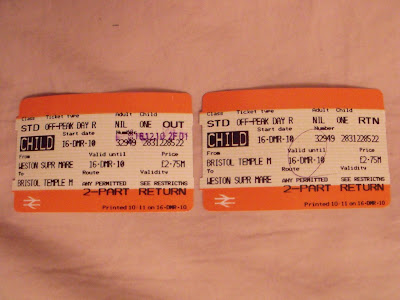
We decided to film on the train instead of the bus as it would be more steady and there would be more room to film. This was limitied time as a train to Bristol from Weston-super-Mare is rounghly 30 minutes, we had to get 9 shots done including the speeded up footage for the effect. Luckily, we managed to get it all done just in time.
Mike and Vanessa then went round Bristol filming their day for the handicam footage. They got some good shots but we will have to edit them after christmas now.
We had a few problems as Mike forgot his SD card and ipad so we had no way of recording the footage or being able to mime intime. We decided to go to tesco's and Mike brought a 4BG SD card so we could film, instead of going all the way back to his house, and he used his ipod in the shots to he could tell when he was in time. This might not look good though as he is singing, playing the guitar and listening to an ipod.
We decided to film on the train instead of the bus as it would be more steady and there would be more room to film. This was limitied time as a train to Bristol from Weston-super-Mare is rounghly 30 minutes, we had to get 9 shots done including the speeded up footage for the effect. Luckily, we managed to get it all done just in time.
Mike and Vanessa then went round Bristol filming their day for the handicam footage. They got some good shots but we will have to edit them after christmas now.
Saturday, 11 December 2010
Filming!
Saturday we went filming on location. We were filming on Weston's beach although the weather wasn't on our side as the sun wasn't out. However, we managed to get everything filmed for that location.
We spent a lot of time with the tracking scene as we couldn't get the camera to stay straight enough. We tried walking with a gorilla stand, walking with just the camera and putting the camera on a push chair. We finally decided to keep the camera still on the stand and zoom out slowly to give the effect of tracking. If we had access to a dolly we would have used one.
Overall, a productive day of filming.
Friday, 10 December 2010


Subscribe to:
Posts (Atom)